Hi All,
We had a requirement where we had to seperate comma seperated values and unpivot it
i,e if the column is Valid,Input, Outcome then expected results are
1. Valid
2. Input
3. Outcome
To acheive this, I used the below query
Hi All,
We had a requirement where we had to seperate comma seperated values and unpivot it
i,e if the column is Valid,Input, Outcome then expected results are
1. Valid
2. Input
3. Outcome
To acheive this, I used the below query
Use the below query
SELECT
t.NAME AS TableName,
s.Name AS SchemaName,
p.rows,
SUM(a.total_pages) * 8 AS TotalSpaceKB,
CAST(ROUND(((SUM(a.total_pages) * 8) / 1024.00), 2) AS NUMERIC(36, 2)) AS TotalSpaceMB,
SUM(a.used_pages) * 8 AS UsedSpaceKB,
CAST(ROUND(((SUM(a.used_pages) * 8) / 1024.00), 2) AS NUMERIC(36, 2)) AS UsedSpaceMB,
(SUM(a.total_pages) - SUM(a.used_pages)) * 8 AS UnusedSpaceKB,
CAST(ROUND(((SUM(a.total_pages) - SUM(a.used_pages)) * 8) / 1024.00, 2) AS NUMERIC(36, 2)) AS UnusedSpaceMB
FROM
sys.tables t
INNER JOIN
sys.indexes i ON t.OBJECT_ID = i.object_id
INNER JOIN
sys.partitions p ON i.object_id = p.OBJECT_ID AND i.index_id = p.index_id
INNER JOIN
sys.allocation_units a ON p.partition_id = a.container_id
LEFT OUTER JOIN
sys.schemas s ON t.schema_id = s.schema_id
WHERE
t.NAME NOT LIKE 'dt%'
AND t.is_ms_shipped = 0
AND i.OBJECT_ID > 255
GROUP BY
t.Name, s.Name, p.Rows
ORDER BY
TotalSpaceMB DESC, t.Name
To get column names, datatypes and its maximum length use below code
SELECT C.NAME AS COLUMN_NAME,
TYPE_NAME(C.USER_TYPE_ID) AS DATA_TYPE,
C.MAX_LENGTH
FROM SYS.COLUMNS C
JOIN SYS.TYPES T
ON C.USER_TYPE_ID=T.USER_TYPE_ID
WHERE C.OBJECT_ID=OBJECT_ID('[pce].[Product_Fact]');
Hi All,
Execute the below query to view the full text index details
SELECT
t.name AS TableName,
c.name AS FTCatalogName ,
i.name AS UniqueIdxName,
cl.name AS ColumnName,
cdt.name AS DataTypeColumnName
FROM
sys.tables t
INNER JOIN
sys.fulltext_indexes fi
ON
t.[object_id] = fi.[object_id]
INNER JOIN
sys.fulltext_index_columns ic
ON
ic.[object_id] = t.[object_id]
INNER JOIN
sys.columns cl
ON
ic.column_id = cl.column_id
AND ic.[object_id] = cl.[object_id]
INNER JOIN
sys.fulltext_catalogs c
ON
fi.fulltext_catalog_id = c.fulltext_catalog_id
INNER JOIN
sys.indexes i
ON
fi.unique_index_id = i.index_id
AND fi.[object_id] = i.[object_id]
LEFT JOIN
sys.columns cdt
ON
ic.type_column_id = cdt.column_id
AND fi.object_id = cdt.object_id;
Issue - Make sure SQL Database firewall allows Integration runtime to access. Login failed for user <token-identified-principal>
Resolution -
Step 1 - Ensure that Allow Azure services are clicked as YES
Step 2 -
CREATE USER [ADF Managed Identityname] FOR EXTERNAL PROVIDER;
GO
Issue - Managed ACl are not applid to child or sub folders in Azure
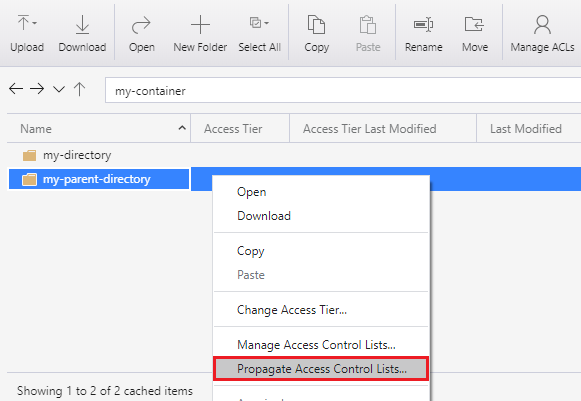
Resolution - Follow below steps after connecting your storage account using STORAGE EXPLORER
You can apply ACL entries recursively on the existing child items of a parent directory without having to make these changes individually for each child item.
To apply ACL entries recursively, Right-click the container or a directory, and then click Propagate Access Control Lists. The following screenshot shows the menu as it appears when you right-click a directory.